Public Page Caching Issue

cadams

New member
Hi,
I'm trying to setup public page caching but can't get it to turn on as I can't select the cache time when the dropdown box opens up as shown in the attached image. Any idea what might be going wrong?

Thanks in advance
 

Attachments

  • Screenshot 2026-04-16 111725.webp
    Screenshot 2026-04-16 111725.webp
    40.8 KB · Views: 0
Solution
It really looks like something is manipulating the page DOM. The drop-down list as well as the button to submit it are missing, and they aren't loaded in via JavaScript (so shouldn't be an issue with AJAX or JavaScript not loading).

Are you able to try a different browser/device to see if it's something specific to that device? Maybe an ad blocker (they do a lot of DOM manipulation and tend to cause a lot of problems)?

It's possible something third-party in WordPress may be doing it as well. I've seen plugins that are supposed to block ads in the admin interface do it incorrectly, and also block things that it shouldn't be blocking.
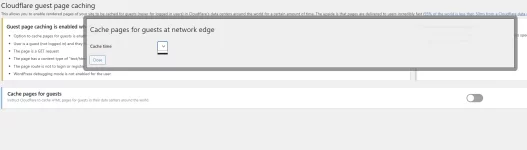
It really looks like something is manipulating the page DOM. The drop-down list as well as the button to submit it are missing, and they aren't loaded in via JavaScript (so shouldn't be an issue with AJAX or JavaScript not loading).

Are you able to try a different browser/device to see if it's something specific to that device? Maybe an ad blocker (they do a lot of DOM manipulation and tend to cause a lot of problems)?

It's possible something third-party in WordPress may be doing it as well. I've seen plugins that are supposed to block ads in the admin interface do it incorrectly, and also block things that it shouldn't be blocking.
 
Solution
Hi Shawn,

Thanks for coming back to me so quickly. You're right, it was the fastpixel caching plugin that I've been using, as soon as I deactivated it, the page worked correctly and seems to be working ok after reactivating. Now to see if there's any conflicts running both!
 
Hmmm... interesting. Can't imagine what the reasoning would be that it would be stripping out data from drop-down boxes and removing submit buttons. Also seems strange it would be caching anything in the admin area (normally a bad idea).

I can't speak for why it would be doing certain things, but at the most basic level it should be fine to run both since ours is upstream of your origin server at the network edge. That being said, I'm not sure there's much value to have what effectively becomes a cache for a cache. More things to go wrong (for example maybe you purge *a* cache, but not all caches), and it also potentially makes things slower, not faster. I'd definitely do some testing/benchmarking to make sure having a cache for a cache actually makes things faster/better.
 
Back
Top